Skip to content
YOUR AI AGENT FOR GOOGLE ADS

Your agent does the preparation.
You make the call.

Entryway reviews your account, drafts ad copy, and prepares the next proposal. You set the direction and approve live changes.

Free audit. No card required.
01 / ACCOUNT REVIEWS

Your account review, prepared for you.

Give Entryway your account goal. It reviews performance and business context, then brings back findings, evidence, and next steps for your decision.

  • Campaign trends and comparison periods brought together.
  • Findings grounded in your business context.
  • Proposed next steps with the evidence beside them.
  • Search-intent and keyword-health tools for a closer look.
Explore performance
You ask

“What needs attention in our acquisition campaign?”
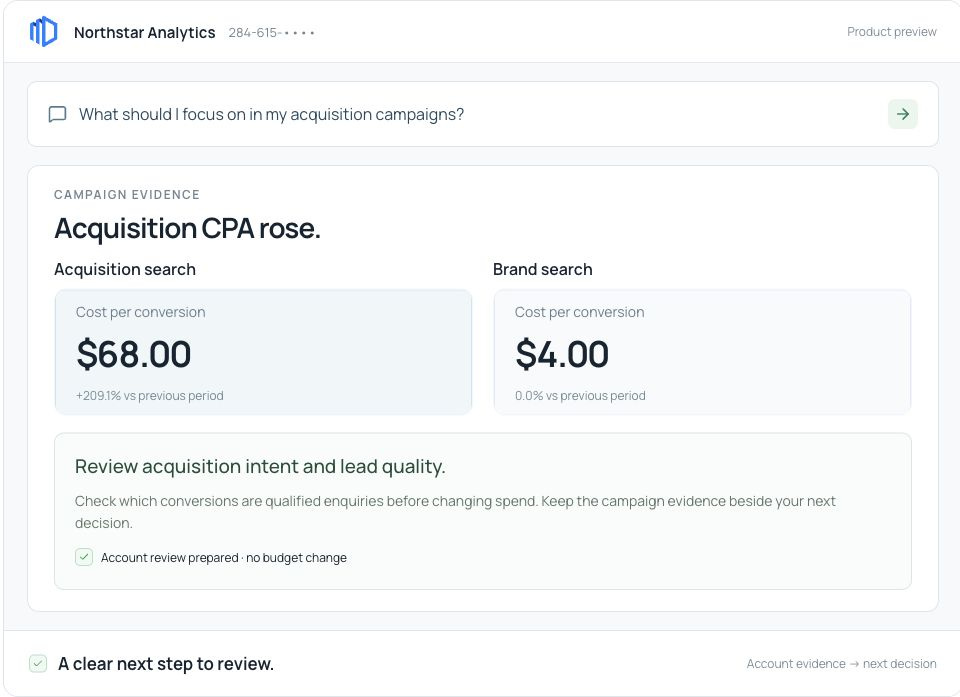
Account evidence reveals an acquisition CPA increase and a next step to review.
Entryway preparesAccount findings and a next step to review.
02 / CAMPAIGNS & LANDING PAGES

Campaign changes, prepared for your review.

Entryway drafts ad copy from your business facts and prepares keyword suggestions for existing ad groups. On Canvas, ask it to reorganize an existing draft or adapt it for new cities.

  • Search headlines and descriptions grounded in confirmed facts.
  • Keyword and negative-keyword proposals for existing campaigns.
  • Structure changes prepared for your saved Canvas draft.
  • Local variants adapted from your source campaign.
Explore campaign preparation
You ask

“Adapt our advisory campaign for Austin.”
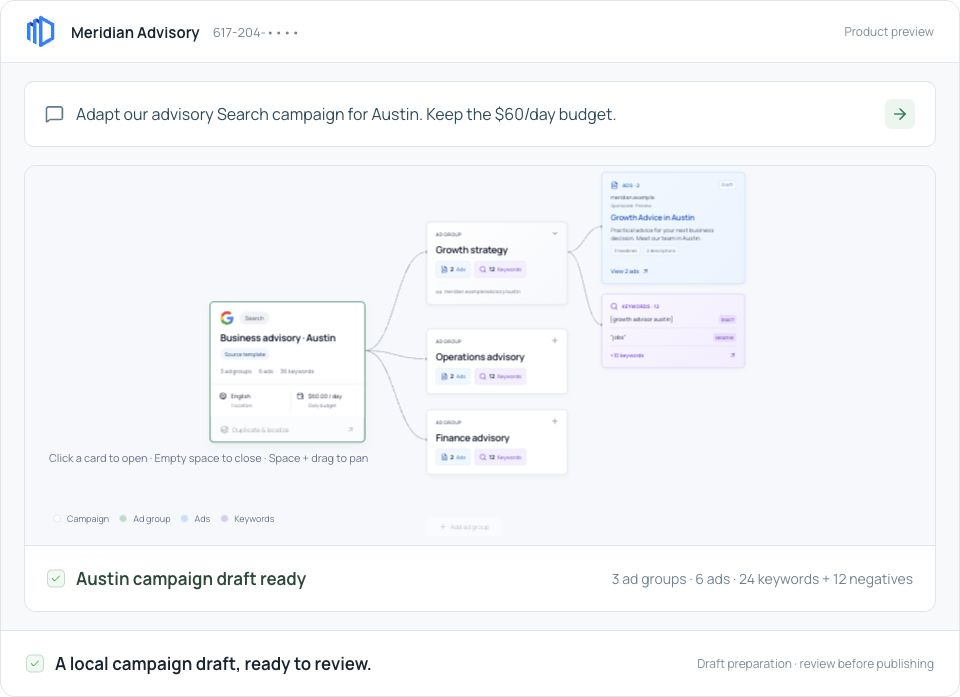
An existing advisory campaign is adapted for Austin, with local ad groups, ads and keywords ready to review.
Entryway preparesA local campaign draft, ready to review.
LANDING STUDIO

A landing page draft for your next campaign.

Give Landing Studio a brief and your confirmed business facts. It prepares a page you can edit and preview before exporting responsive HTML.

  • Save page versions and restore an earlier draft.
  • Import design references into your library.
  • Export responsive HTML with your chosen button destinations.
Explore Landing Studio
YOUR REQUEST

Draft a page for our advisory service.
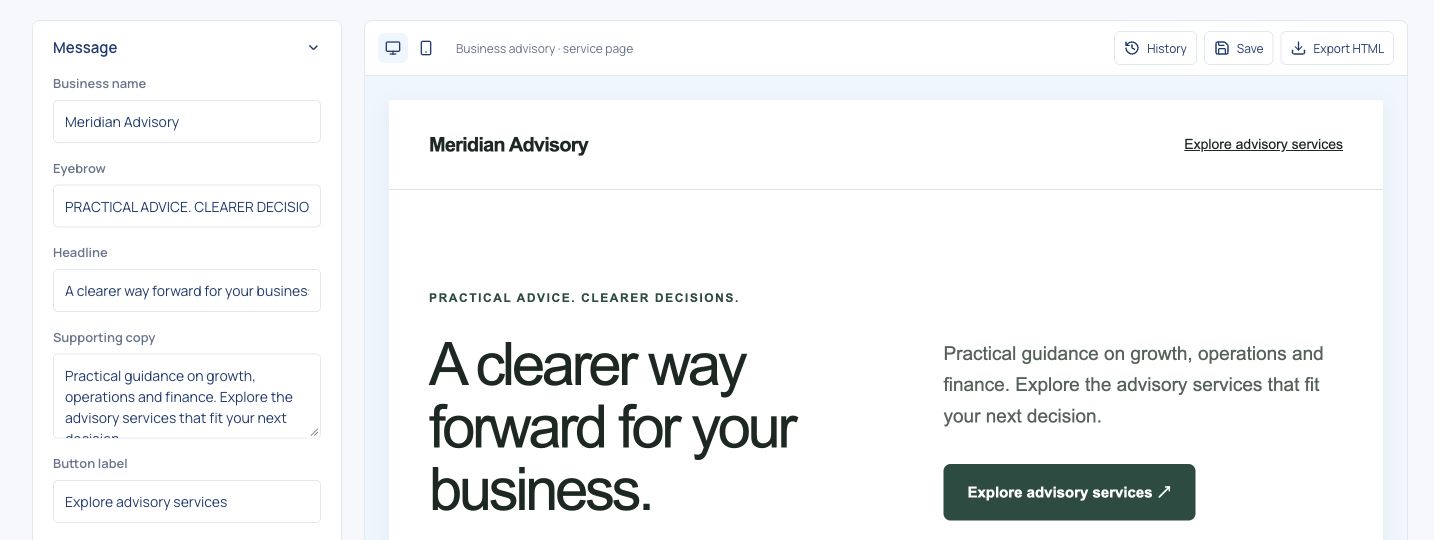
Landing Studio with an advisory brief, editable page controls and a desktop page preview.
Page draft ready to edit · Responsive HTML export
03 / ASSISTANT, CARDS & CANVAS

From request to review, in one workspace.

Give your agent an account review or campaign job. Open its findings, drafts, and proposals in the connected workspace, with the original request beside the result.

  • The same account review in the assistant and saved artifact.
  • Running work, review requests, and completed results in view.
  • Canvas proposals linked to the campaign draft.
  • Each account’s requests and history kept together.
Explore the shared workspace

Watch a campaign get localized across cities.

You ask

“Adapt this campaign for our new city markets.”
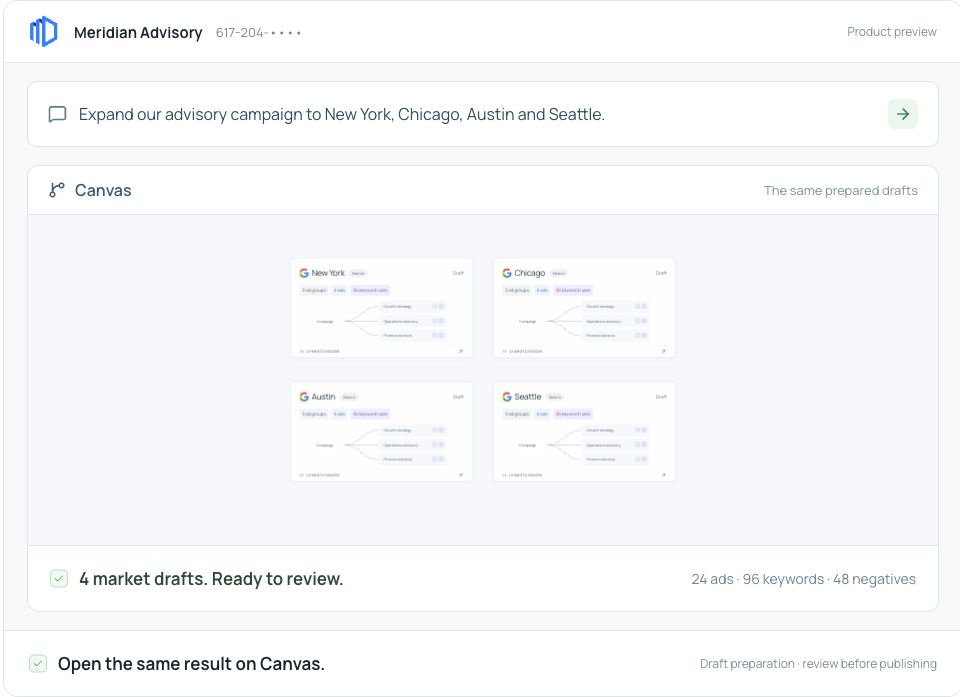
One request prepares four local campaign drafts, visible in the assistant and on Canvas.
Entryway preparesLocal draft variations, ready for review.
04 / BUSINESS CONTEXT

Your business facts guide every draft.

Your confirmed offer, audience, and business facts become the context for new work. Entryway uses that brief and your saved strategy to ground account reviews, ad copy, and page drafts.

  • Services, audiences, locations, and goals in one business brief.
  • Source records and strategy material kept with the facts.
  • Your confirmation before facts are used to ground new work.
  • Saved context carried into reviews, copy, and page drafts.
See context in a campaign brief
WebsiteNotes & filesStrategy
CONFIRMED BUSINESS BRIEF

Your offer. Your audience.
Your agent’s context.

Confirm the facts and their sources.
Keep the details specific to your account.

Reviewed context
Account reviewsCampaign plansLanding-page drafts
05 / REVIEW & CONTROL

The exact change. Ready for your approval.

Entryway turns supported recommendations into reviewable change plans. You approve what gets applied; Entryway records the provider response and checks the Google Ads configuration.

  • Current and proposed changes presented side by side.
  • Targeting, keyword operations, and budget exposure in view.
  • Exact approval through your account’s permissions.
  • Provider receipts and configuration checks saved with the work.
Inspect a draft change

Available live actions depend on the connected account, permissions and enabled workflow.

You ask

“Prepare my reviewed exclusions for Pipeline Search.”

Six campaign exclusions are prepared for exact human approval, then applied and checked against the approved Google Ads configuration.
Entryway preparesAn exact change to approve. A saved result to inspect.
06 / REPORTS & MULTIPLE ACCOUNTS

Your results, in a report you can shape.

Your agent can draft an account update for your team. In the report builder, you choose the metrics and sections, add your commentary, and save an edition with its captured account data.

  • Choose report metrics, sections, brand colors and goals.
  • Add editable commentary and next steps.
  • Save fixed editions with the report and its captured data.
  • Export campaign CSV or print a report to PDF.
Explore reports

Each part of your business, in one view.

Keep each location’s accounts and business context together. Compare priorities across your accounts and open the work that needs your attention.

Explore multiple accounts

Hand off the research.
Keep the final say.

Connect Google Ads.

Choose the account and the business workspace you want to work in.

Review your free audit.

Get account findings and a clear action plan. No AI provider key required.

Put your agent to work.

Choose a paid plan and connect your AI provider when you’re ready to delegate the work.

Can I explore before connecting an account?

Yes. Create your free account and connect Google Ads to review your account in the workspace.

Which advertising platforms are available?

Entryway currently starts with Google Ads. Available actions depend on account permissions and the workflows enabled in your workspace.

Can Landing Studio publish my page?

Landing Studio prepares editable page drafts and exports responsive HTML. Deploy that HTML through your own website or hosting workflow.

What do I get for free?

Your free account includes an account audit, action plan, and campaign canvas. No card or AI provider key is needed for the audit. Choose a paid plan when you’re ready to use your agent. Business starts at $49/month; AI provider usage and ad spend are separate.

Your next account review.
Prepared for you.

Get the findings and next steps. Make the decision yours.

Join for free

Free audit. No card required.

Explore the workspace first